

June 09, 20268 min read

I’ve been writing terminal applications and CLI libraries for years. Coco, my AI-powered git assistant, is probably the one I use most (you can also poke around its dedicated home at coco.griffen.codes). At this point there’s ink-playing-cards, a React/Ink framework for terminal card games, localPress, a local-first WordPress media gallery optimization/management tool, plus a handful of smaller things scattered across my GitHub. So when I started thinking about what to build next, I had a lot of prior experience to lean on.
I’ve been a GitKraken subscriber for a long time, and lately I’m having a harder time justifying the price tag. Most of what I actually use it for is stuff I could do in a terminal if the experience was good enough. Coco already gives me a clean layer on top of git for commits, changelogs, and code review. What it doesn’t have yet is a real interface. I want to take it from “useful CLI” to “the thing I open instead of GitKraken.”
That meant I needed to start thinking seriously about TUI design. And once I started, I realized I didn’t want to just learn this stuff for myself. I wanted every project I touch from here on out to reap the rewards/
The skill, briefly
tui-design-skill is a Claude Skill that teaches the model how to design clean, professional terminal UIs and command-line tools across Go, Rust, Python, and TypeScript. You can install it as a Claude Code plugin from my gfargo/skills marketplace, via Vercel’s npx skills, or upload the .skill file directly to Claude.ai.
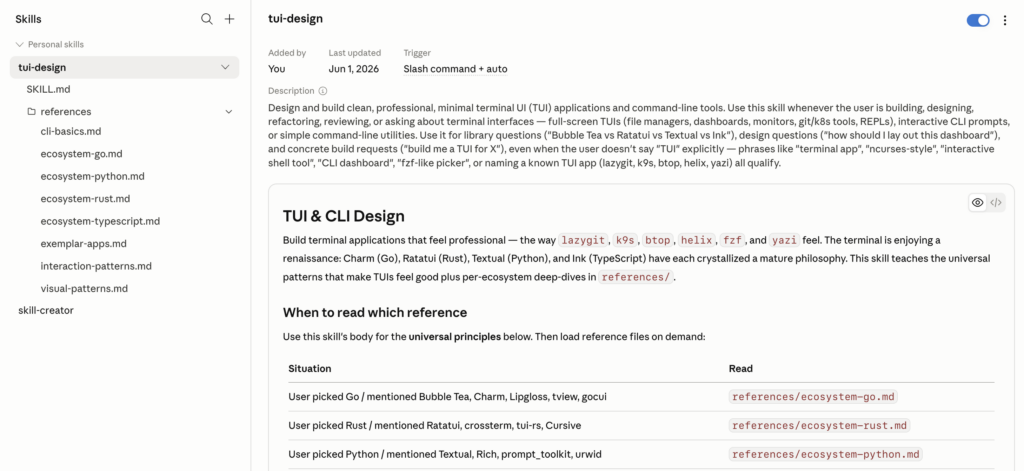
It loads automatically when you ask Claude to build a TUI, review one, pick between Bubble Tea and Ratatui, or design a specific layout. You don’t have to remember to invoke it. It just shows up.
I modeled it on Anthropic’s frontend-design skill. That one is genuinely impressive: ask Claude to build a web component and the output looks like something a designer touched, not something a model spat out. I wanted the same thing for terminals.
What’s in it
About 3,900 lines across 9 files, but Claude only loads what’s relevant to the current question. The top-level SKILL.md covers the universal stuff:
- Seven canonical TUI layouts (multi-panel, miller columns, drill-down stack, dashboard, IDE three-panel, overlay, tabbed-within-panel)
- Visual hierarchy in monospace (color, weight, reverse video, borders, density)
- Color as a semantic system, the
NO_COLORconvention, accessibility tradeoffs - Cross-app keybinding conventions (
q,?,/,Esc,hjkl,Tab,Ctrl+P) - The four non-negotiables: alt screen, panic-safe terminal restore,
SIGWINCHhandling,SIGTSTPhandling. Get those wrong and your beautiful TUI leaves the user’s terminal in a broken state when something crashes.
Then there are per-ecosystem references that load on demand:
- Go: Bubble Tea, Lipgloss, Bubbles, Huh, tview, gocui, Cobra, Wish, gum
- Rust: Ratatui, Crossterm, color-eyre panic safety, Cursive, clap, cliclack
- Python: Textual, Rich, prompt_toolkit, Typer, questionary
- TypeScript: Ink (which Claude Code, GitHub Copilot CLI, and Gemini CLI all use), @clack/prompts, @inquirer/prompts, OpenTUI
Plus a CLI basics doc that synthesizes clig.dev, 12-Factor, POSIX, XDG, and sysexits. A visual patterns reference that goes deep on borders, color tiers, density, tables, and theming. An interaction patterns doc that dissects how fzf, lazygit, k9s, and helix handle focus and discoverability. And an exemplar apps reference with case studies of about a dozen well-designed terminal apps (lazygit, k9s, btop, helix, yazi, atuin, htop, Posting, Harlequin, Claude Code itself, starship) and the concrete lessons each one teaches.
The point of the references is that you don’t have to load all of it. If you’re working in Rust, the Go and Python files don’t enter Claude’s context. The skill stays cheap until you need it deep.
Why this and not just better prompts
I tried “just better prompts” first. I have a .claude/CLAUDE.md for coco with notes on the codebase, and I’d been adding TUI conventions to it as I learned them. It worked, but only for coco. Every other project I touched, I was starting over.
A skill solves that. Once it’s installed, it’s there for every conversation, every project, every codebase. And because it’s structured with a top-level entry point that routes to deeper references, Claude can be selective about what it actually reads. That matters when you’re already burning context on the project itself.
What I’m building with it next
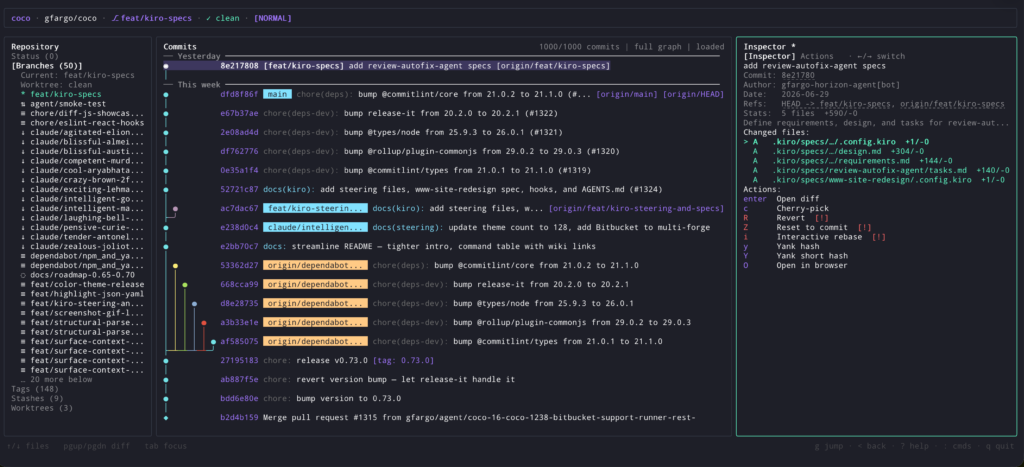
The first real test is upgrading coco. Right now the interactive mode is a basic prompt-and-confirm loop. What I want is something closer to lazygit’s feel: a real layout with the diff on one side, the commit message on the other, keybindings that feel like muscle memory, the ability to stage hunks visually, and a status bar that tells me what every key does without me having to remember.
If the skill works the way I want it to, that upgrade should feel like a real collaboration with Claude. Not me dictating every detail, but me describing what I want and Claude pushing back with “have you considered miller columns instead, because of how you described the navigation flow.” That kind of design conversation is what I’m after.
Install it
tui-design now lives in my central gfargo/skills marketplace, alongside my other skills, so you can add it once and install any of them. Here are the install paths.
Claude Code:
/plugin marketplace add gfargo/skills
/plugin install terminal@gfargo-skillsThat installs it as terminal:tui-design. The terminal plugin also bundles vhs-cli-demos, for capturing screenshots and demo GIFs of terminal apps. Update later with /plugin marketplace update gfargo-skills.
Vercel’s npx skills (works for Cursor, Codex CLI, Gemini CLI, Aider, Windsurf, or project-local installs):
npx skills add gfargo/tui-design-skillClaude.ai: download the latest tui-design.skill from Releases and upload it via Settings > Customize > Skills.
The README has the full breakdown, build-from-source instructions, and a few example prompts to get you started.
Issues and PRs welcome, especially library updates when things change (Bubble Tea v2, new Ratatui widgets, Textual API shifts) and new exemplar apps worth studying. If you build something with it, I’d love to hear what you made!
Keep Reading


Discussion
Have thoughts? Drop them in.
Comments are powered by Disqus. Sign in once, comment anywhere.
Loading comments…